
NSF 2 Month Rule Handbook
NSF Account Management
2 Month Rule Policy
NSF Definition
As a general policy, NSF limits the salary compensation requested in the proposal budget for senior personnel to no more than two months of their regular salary in any one year. This limit includes salary compensation received from all NSF-funded grants. This effort must be documented in accordance with 2 CFR § 200, Subpart E, including 2 CFR § 200.430(i).
If anticipated, any compensation for such personnel in excess of two months must be disclosed in the proposal budget, justified in the budget justification, and must be specifically approved by NSF in the award notice budget. Under normal rebudgeting authority, a recipient can internally approve an increase or decrease in person months devoted to the project after an award is made, even if doing so results in salary support for senior personnel exceeding the two month salary policy.
No prior approval from NSF is necessary as long as that change would not cause the objectives or scope of the project to change. NSF prior approval is necessary if the objectives or scope of the project change.
OIG Clarification of 2 Month Rule Policy
OIG stated that payroll transactions incurred after NSF revised its policies and procedures (December 26, 2014) will be audited against those procedures, which permit awardees to unilaterally increase salary budgets for senior personnel in excess of two months of their regular salaries. The revisions were prospective and do not apply to payroll transactions made before December 26, 2014.
Sponsor/University Guidance
Within each fiscal year, Purdue University employees identified as senior personnel within the proposal are allowed to charge up to 2 months salary regardless of their total budgeted salary on the award.
Purdue University defines the term “fiscal year” as the University fiscal year (July-June) for purposes of the NSF limitation on salary compensation for senior personnel.
Senior personnel may exceed this limit if:
- Additional time was included within the proposal budget, justified in the budget justification, and approved within the NSF award; or
- The increase falls within normal rebudgeting authority as described above in the NSF definition.
Cooperative Agreements
Large Cooperative Agreements awarded by NSF require a revised budget and budget justification to be submitted on an annual basis. Per Beth Strausser of the NSF Policy Office, these budgets “supersede” the original proposed budget.
The source handbook notes that it may be necessary to budget additional salary using the COEUS Proposal Budget instead of the NSF Proposal Budget.
Expectations
General
Pre-Award
- Enter appropriate salaries, including Administrative Supplements, for proposals being submitted to NSF.
- Include reference to senior personnel salary in the budget justification.
- Indicate any additional time in excess of 2 person months on the proposal route sheet.
- Upload the most current NSF Proposal Budget in the COEUS Proposal Development record.
Business Office
- Use the Online 2 Month Calculator to ensure compliance with the NSF requirement.
- Review the Online 2 Month Calculator for accuracy and notify NSF Post-Award of any discrepancies.
- Correct any non-compliance issues when identified.
- Maintain Permission Management within the web-based tool to ensure appropriate departmental access.
Post Award
- Distribute agency guidelines to appropriate University departments.
- Meet with Business Offices to provide personalized 2 Month Rule training.
- Update the Online 2 Month Calculator at the time of award, primarily based on the submitted and approved NSF Proposal Budget.
- Notify the Business Office of the update in the Notice of Award email.
- Post Award may use the COEUS Proposal Budget for large cooperative agreements when necessary to properly monitor the award.
Award Establishment
Post Award
- Update the Online Calculator based on the approved NSF budget for all applicable fiscal years.
- Cooperative Agreements that require yearly revised budgets will only have the first year’s time awarded.
- Notify the Business Office that the web-based tool has been updated and request review of the budgetary information.
- Business Offices should notify SPS if adjustments are needed to the budget information entered at award setup.
During the Project
Post Award
- Update the Online Calculator as requested by the Business Office.
- Conduct an Annual Fiscal Review of all Senior Personnel for the previous fiscal year and correspond with the appropriate Business Office and Senior Personnel as necessary.
Business Office
- Run the Overdraft Report within the web-based tool on a monthly basis.
- Notify NSF Post-Award of changes in Administrative Adjustments throughout the year.
- Notify NSF Post-Award if overdrawn individuals are not senior personnel and provide documentation supporting their exception from the 2 month rule.
- Enter projections of salary to ensure compliance will be met at the end of the fiscal year.
- Provide approved revised budgets, as required by NSF, to NSF Post-Award for large cooperative agreements and grants.
At Closeout
Post Award
- Review 2 Month Rule compliance for all senior personnel charged to the project.
- Update the web-based calculator for any missing salary data.
- Notify the Business Office of issues that arise during the review.
- Remove additional months from the award if transferred from Purdue.
Business Office
- Review the web-based calculator and verify accuracy.
- Remove any salary in excess of the allowable amount.
Annual and Final Review of Senior Key Personnel
SPS Post-Award will identify Senior Key Personnel who have exceeded their allotted time budgeted by greater than 25% on an annual basis, after the end of the fiscal year, and at grant closeout.
Post-Award will send an email to the Senior Personnel/PI who exceeded the allotted time to ask whether a change of scope has occurred on all projects from which that person received compensation. Post-Award will only accept the response from the PI on the project regarding change of scope.
The response will be captured and placed in the SPS grant file within Perceptive Content for each grant from which the overdrawn personnel was paid.
The Business Office will be copied on the initial email. If no response is received after 15 days, a second request will be sent to the Senior Personnel/PI. If no response is received after another 15 days, SPS Post-Award will follow up with the Business Office to request assistance obtaining a response.
Senior Personnel who have exceeded their allotted time by less than 25% will be automatically cleared from the salary calculator by Post-Award, with a note entered in the calculator.
Frequently Asked Questions
Does the NSF salary rule apply to all faculty members and staff charged to an NSF grant?
No. The NSF policy applies only to senior personnel.
The source handbook describes senior personnel as including:
- (Co) Principal Investigator(s): the individual(s) designated by the proposer and approved by NSF who are responsible for the scientific or technical direction of the project.
- Faculty Associate: an individual other than the Principal Investigator(s) considered by the performing institution to be a member of its faculty, or who holds a faculty appointment at another institution, and who will participate in the supported project.
Who does the NSF two-month salary policy NOT apply to?
- Graduate Students
- Post docs not considered senior personnel
- Research scientists not considered senior personnel
- Other personnel not considered senior personnel
Does the NSF two-month salary policy apply to Purdue cost share orders associated with NSF projects?
No. The policy does not apply to Purdue cost share orders.
If a PI does not charge salary in year 1, will that additional time be available for use during a future fiscal year?
No. The salary limit for each fiscal year is 2 months for all active NSF awards for each senior personnel, unless the amount budgeted in a particular year is greater than 2 months.
What if a PI has multiple salary rates within a given fiscal year?
Always use the highest salary rate for the fiscal year.
Should a PI’s salary be budgeted by dollar amount or person months?
NSF policy speaks in terms of person months when addressing senior personnel salaries; therefore, always use person months when budgeting a PI’s salary.
How do we determine what fiscal year additional budget applies to?
The NSF Approved Proposal Budget. Starting Fiscal Year 2015, the source handbook states that the COEUS Proposal Budget is no longer used as the primary means of allocating budget.
For additional NSF salary questions, the source handbook directs users to contact an NSF Research Administration Specialist or email spnsfhhs@purdue.edu.
2 Month Rule Resources
Sponsored Programs Salary Cap Web Calculator
The NSF 2 Month Calculator is a tool developed by Sponsored Program Services to provide calculations and efficiently deliver information to support University compliance with the associated federal regulations.
The online tool is based on guidance released by the National Science Foundation as well as Purdue University grant administration and SPS processes. Salary data included within the calculator is updated on a monthly basis.
Permission Management
The source handbook states that Business Managers have access to the online calculator.
- Login to the DHHS/NSF Salary Online Calculator.
- Select Permission Management.
- Enter the individual’s Purdue Career Account username in the search box.
- Select Add Access when the individual is located.
- To remove an individual, use the remove control next to the user information.
Web Calculator User Guide
Access Instructions
- Login to the Online Calculator using your Career Account and password. Permissions must be established before access is available.
- Select the NSF Salary Calculator from the application navigation.
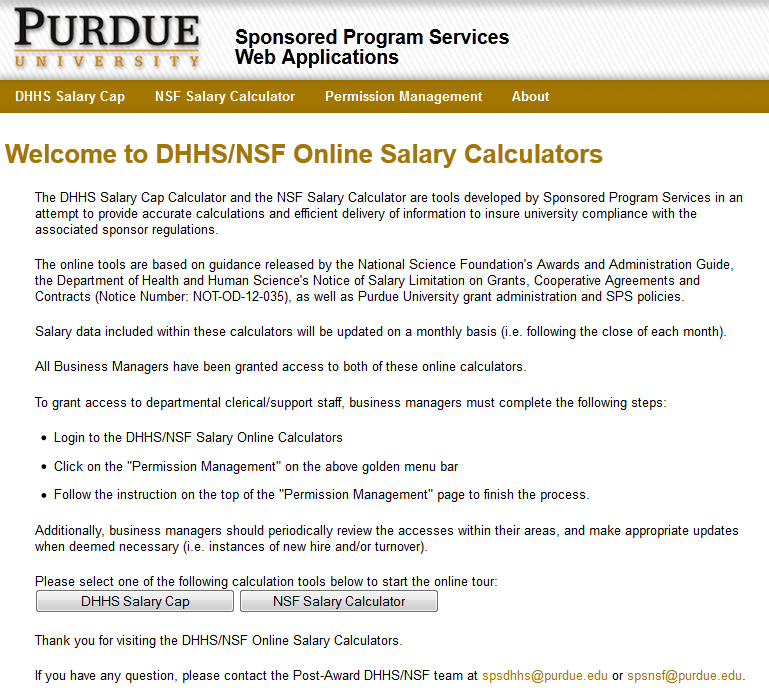
- To search for a specific calculator, enter the Person ID or use the Look Up tool to locate the individual.

Search by Person ID
Enter the Person ID number for the individual you wish to review. If the number is unknown, use the Look Up option. The lookup form allows searching by Purdue ID, first name, and last name.
If an incorrect Person ID is entered, the calculator displays an error message. The source handbook directs users who believe the message is in error to contact spnsfhhs@purdue.edu.
Calculator Screen
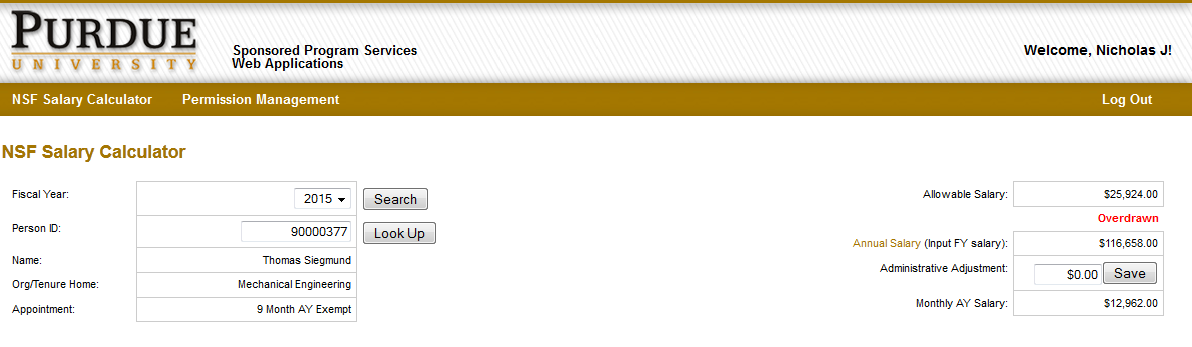
Fiscal Year
The source handbook states that the calculator contains information for an individual dating back to Fiscal Year 2010. The system defaults to the current fiscal year, and the fiscal year selector can be used to review past or future fiscal years.
Payroll Data
- Payroll data is uploaded monthly.
- The calculator uses the data to determine the allowable 2 month salary.
- The individual’s annual salary plus administrative adjustment is divided by the appointment period - Academic Year (9 month) or Fiscal Year (12 month) - to determine monthly salary.
- The monthly salary is multiplied by 2 to determine the standard allowable salary.
- If additional time was approved by NSF, the allowable salary is increased by the approved additional amount.
Additional Time
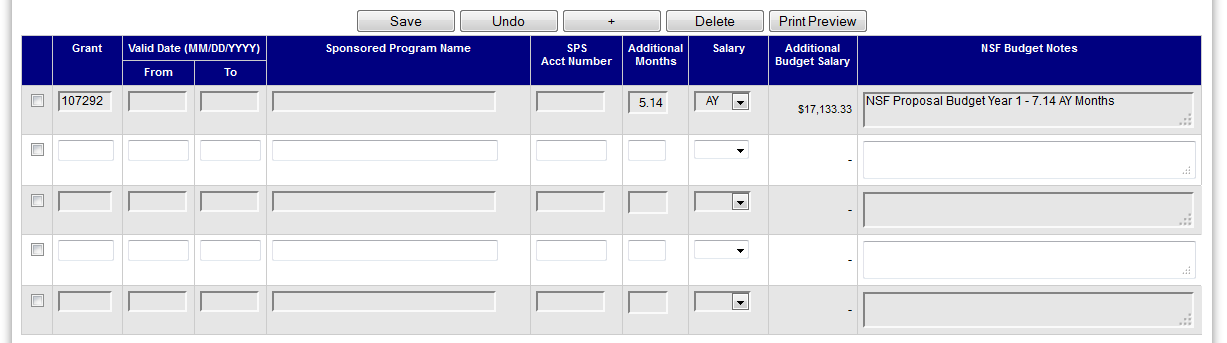
The Additional Time section shows awards on which the individual was specifically identified in the budget for approved support above the standard 2 months. The source handbook states that only NSF Post-Award can update this section.
- Grant Number
- SAP number created by SPS Post-Award.
- Additional Months
- Additional time that increases Allowable Salary.
- NSF Budget Notes
- Used primarily to note where the Additional Months information came from.
Why can the budget notes show 7.14 months while Additional Months shows 5.14?
The calculator automatically includes the standard 2 months of institutional salary. Only support beyond those 2 months is entered in Additional Months. Therefore, if 7.14 months of support is approved, 5.14 months is entered as additional time because 2 months is already built into the calculation.
Salary Information
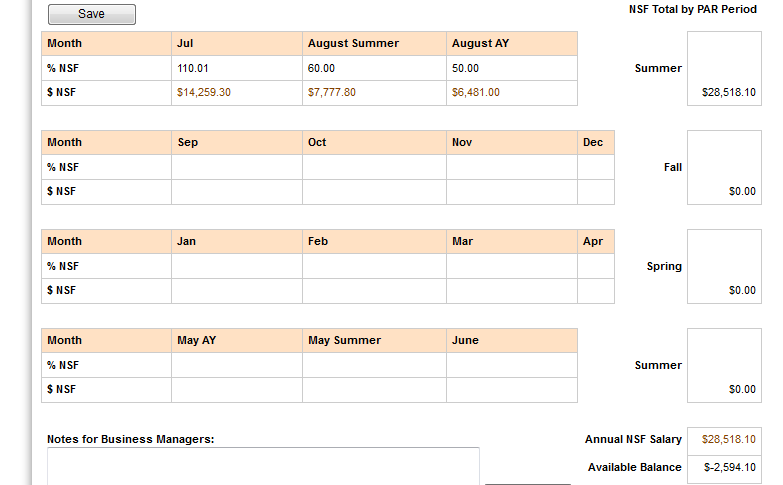
Salary charged to NSF projects is uploaded monthly. Post Award and Business Office staff can review the projects associated with salary for a selected month. Months for which salary has not yet posted may be used for projections. Once actual salary posts, the projection is replaced by the actual salary charged.
Overdrawn Salary
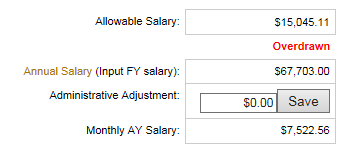
If an individual exceeds the allowable balance, the source handbook states that two overdrawn warnings appear on the calculator screen. The calculator also displays the variance percentage based on the dollar overdraft compared with allowable salary.
Reports Screen
The source handbook identifies four reports for use by Sponsored Programs and Business Office staff:
- Overdrawn Report
- Projection Administrative Report
- Administrative Adjustment Pay Report
- Additional Months Report

Overdrawn Report
This report lists individuals who have exceeded allowable salary for a given fiscal year. It can be sorted by campus, college, and organizational unit.
Individuals appearing on the report should be reviewed and corrective action taken as soon as possible. Actions may include:
- Notify NSF Post-Award of additional time not located on the individual’s calculator.
- Notify NSF Post-Award that the individual is not senior personnel at Purdue.
- If applicable, provide Post-Award information from the project PI regarding whether the overdrawn amount constitutes a change in scope. If the overdrawn individual is not the PI, that individual will need to work with the PI to determine whether a change in scope occurred.
The source handbook states that Post-Award will only accept the response from the project PI regarding change of scope and will retain the response in the SPS grant file for documentation.
Projection Administrative Report
This report lists senior personnel whose projected administrative adjustment differs from the amount currently charged. It should be reviewed so incorrect projections can be corrected promptly.
Administrative Adjustment Amount
This report lists NSF funding payments that include administrative adjustments.
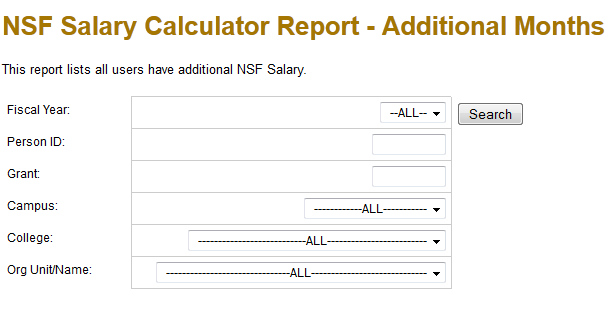
Additional Months Report
This report can be used to find individuals who have additional time and should be used when an NSF award is transferred from Purdue University to another institution.
Transfer Process
- Once an award is transferred from Purdue University, the Post-Award specialist should run the Additional Months report by the grant number being transferred and remove all additional months from future fiscal years.
- For the current fiscal year, the maximum number of additional months can only equal the number of months elapsed in the current fiscal year.
- Example from the source handbook: if a grant is transferred December 31, 2015, the maximum number of additional months for that fiscal year is 6 months.
